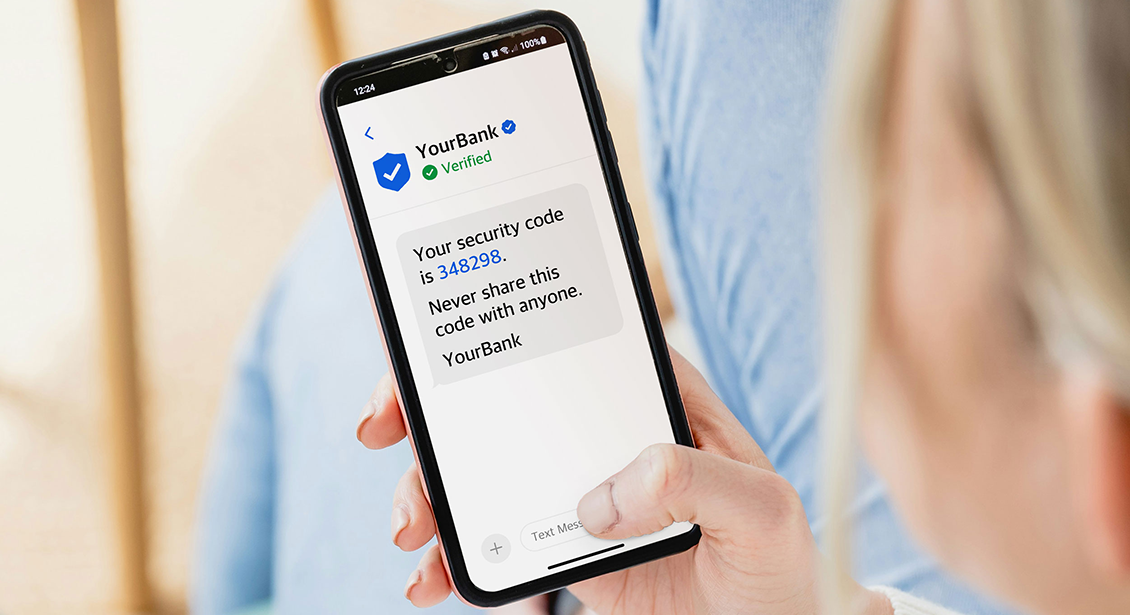
Helping you identify text message scams
Text messages can be a source of scams that try to trick you into giving up personal information to scammers. There are now new rules that make it easier for you to quickly see when a text is suspicious. The suspicious texts will still be delivered to your phone, but now they will be automatically labelled ‘Unverified’.
The golden rule: Your bank, the government, and many businesses have a messaging policy that says they will never ask you for your personal information, in a text.
How scammers try to fool you using text messages
Usually, when you receive a text message, it will be identified by a phone number, or if it is from someone in your contacts list, their name.
Some text messages only show the name of a business or organisation. For example, you might receive a text message from Telstra, explaining a new phone deal or informing you of network maintenance.
You don’t need to have Telstra in your contacts list, to see the name Telstra on the text message. This is convenient for businesses, but unfortunately it is used by scammers to try to trick you.
The same applies to government agencies. A message that appears with a name on it already, such as Australian Taxation Office, hasn’t been sent from a phone number. It’s been sent using a Sender ID.
A Sender ID is unique, but the way it appears on your phone can be any string of letters. This is the feature scammers use to send fake texts. They will make their own Sender ID using the same letters as a legitimate company to impersonate that organisation. This is a form of spoofing — the same trick scammers use to fake email addresses and caller ID.
For example, you might get a fake text that says Australian Taxation Office. With an ordinary text, you could identify the number by checking it against the ATO’s published contact details, or against your own contacts. But because this just says Australian Taxation Office, there’s no way for you to tell.
How the Unverified label exposes scammers
To help protect Australians from text message scams, The Australian Communications and Media Authority (ACMA) now requires businesses (and organisations) to register their Sender ID.
Now, when someone sends a message using that Sender ID, your mobile phone provider can see that it’s registered, and so the name of the company or organisation will appear on your phone display.
If a scammer tries to copy the company or organisation name and sends a fake message, your mobile phone provider will see the Sender ID is not registered. It doesn’t matter what letters they use; because their Sender ID is not registered, it will always appear on your phone as ‘Unverified’.
‘Unverified’ is different to ‘Unknown’ or ‘Unknown Caller’. An unknown sender or caller might be legitimate, it might just be that your phone doesn’t recognise the number.
Any message labelled ‘Unverified’ must be treated with caution, because it may be a scam, or it may be from a real business or organisation that hasn’t registered their Sender ID yet.
What to do when I receive an Unverified text?
If you receive an Unverified message, avoid clicking links or taking action based on the text alone. If the message appears important, independently contact the organisation using contact details you already know and trust.
How to identify scam texts that aren’t labelled Unverified
Unfortunately, scammers are very resilient, and it is likely you may still receive the occasional scam text. Also, some messaging apps don’t use the mobile phone SMS system, but it can still look like a normal SMS on your phone.
If you receive an unexpected text, especially from a company you do business with, your bank, or a bank or organisation that you’re not sure if you still talk to, it’s a good idea to be suspicious.
You can examine the detail of the text. Because of how text messaging works, it’s safe to just read that text on your smartphone, even if it is a scam.
There are lots of ways to work out if a text is a scam. However rather than trying to work out if the text is from a legitimate number, or if there are any strange spelling errors or other clues, you can get a good idea if it is a scam or not by remembering some key rules. It is almost certain that the text is a scam if it:
- asks you to tap a link to go to a website
- claims there is a problem with your details, and you need to enter them again to confirm them
- says you must act urgently to avoid some bad outcome, like your account being closed down
- asks you to update your password, or download an update for some software you might own, or it says you need to act because of new government regulations.
The most important thing to look out for is a text that asks you to tap a link. These links can be faked to look like legitimate websites. The website will ask you to enter personal information, and this will be stolen by scammers.
For more information about how scammers use SMS, see our course on text and SMS scams.
What happens if I respond to an Unverified text?
The good news is, these texts use a system that’s designed to be one-way only. You can’t accidentally reply to an Unverified text by tapping the wrong button on your phone.
Unverified texts will most likely ask you to go to a website, or call a number to learn more. It’s safest to ignore these. Like with any other text, make sure to never tap a link as this could take you to a scam website.
Don’t worry, Unverified texts are not targeting you personally. The system that sends these kinds of text is designed to send millions at a time. Scammers hope that some people will respond.
When scammers were able to fake the name on the text, this worked well for them. But these new rules should make it much more difficult. A text labelled ‘Unverified’ is almost certain to be a scam and you can safely delete it.
Where to go for help if you think you’ve received a scam text
If you’re ever unsure about a text, don’t tap any links. Instead, you can:- Contact the organisation directly using a phone number or website you already know and trust. Never use a number or link from the text itself.
- Report the scam text to Scamwatch at scamwatch.gov.au/report-a-scam , or forward it for free to 7726 (SPAM) so your provider can investigate.
- If you’ve already tapped a link or shared personal information and think you may have been scammed, contact your bank immediately and get free support from IDCARE at idcare.org or 1800 595 160.
Sharing your experience with friends and family can also help them recognise the same warning signs.
Want to keep learning how to spot scams? Download our free guide to avoiding impersonation scams or view our courses on identifying and avoiding common scams.
Topic outline
- General
General